Flash precompiled firmware
Note
This section applies only to Unijoysticle boards.
To flash the latest firmware without a local toolchain, follow these steps:
-
Download the latest precompiled firmware from the releases page:
-
Flash the binary with either the command line or the GUI tool.
Command Line (esptool)
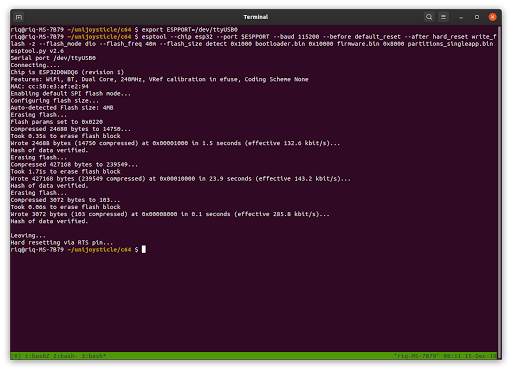
Supported platforms: Linux, macOS, and Windows.
Install esptool.py (source code) for your operating system:
- Ubuntu or Debian:
sudo apt install esptool - Fedora or Red Hat:
sudo dnf install esptool - macOS with Homebrew:
brew install esptool - Windows, macOS without Homebrew, and other operating systems: Install
Python or get Python from the Microsoft Store. Then run
pip install esptool.
Run these commands to flash your device:
# Linux (port name can vary if multiple USB serial devices are connected)
export ESPPORT=/dev/ttyUSB0
# macOS
export ESPPORT=/dev/cu.SLAB_USBtoUART
# Windows (check Device Manager to identify the COM port for your device)
set ESPPORT=COM??

python -m esptool --chip esp32 --port ${ESPPORT} --baud 115200 --before default_reset --after hard_reset write_flash 0x0000 bluepad32-unijoysticle-full.bin
On Linux, standard users need write permission for the ttyUSB device. Grant
permission to your user account or run the command as root.
GUI (ESP32 Flash Download Tool)
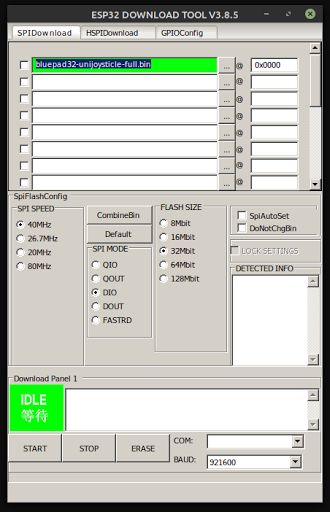
Supported platform: Windows.
Download the ESP32 Flash Download Tool:
Configure the tool with these parameters:
- Set
chipTypetoESP32. - Select the
SPIDownloadtab. - Click
...and select thebluepad32-unijoysticle-full.binfile. - Set the flash address to
0x0000. - Select the target
COMport. - Click
START.
Compile and flash firmware
Windows
-
Install ESP-IDF v5.5. See ESP-IDF Getting Started for Windows for details:
- Use either the Online or Offline installer.
- Keep the default component selections.
- Click
Yeswhen the installer asks for permission to modify the system.
-
Start
ESP-IDF v5.5 CMDfrom the Windows search menu. -
Clone the Bluepad32 repository:
git clone --recursive https://github.com/ricardoquesada/bluepad32.git -
Configure the target platform:
# Configure Bluepad32 platform
cd bluepad32\src
idf.py menuconfig
Select
Component config->Bluepad32->Target platformand choose your target platform. -
Compile and flash the firmware:
# Compile the firmware
cd bluepad32\src
idf.py build

# Flash and open the serial monitor
idf.py flash monitor
Linux and macOS
-
Install the ESP-IDF dependencies:
# For Ubuntu / Debian
sudo apt-get install git wget flex bison gperf python3 python3-pip python3-setuptools cmake ninja-build ccache libffi-dev libssl-dev dfu-util libusb-1.0-0
If you cannot open
/dev/ttyUSB0, add your user to thedialoutgroup (see ESP-IDF serial documentation):# Log out and log back in after you run this command sudo usermod -a -G dialout $USER -
Clone and install ESP-IDF v5.5:
# Clone the ESP-IDF repository mkdir ~/esp && cd ~/esp git clone -b release/v5.5 --recursive https://github.com/espressif/esp-idf.git # Install the toolchain cd ~/esp/esp-idf ./install.sh -
Clone the Bluepad32 repository:
git clone --recursive https://github.com/ricardoquesada/bluepad32.git -
Apply the BTstack patches:
cd ${BLUEPAD32_SRC}/external/btstack git apply ../patches/*.patch -
Compile the firmware:
cd ${BLUEPAD32}/tools/fw
./build.py all